
| 일 | 월 | 화 | 수 | 목 | 금 | 토 |
|---|---|---|---|---|---|---|
| 1 | 2 | 3 | 4 | 5 | ||
| 6 | 7 | 8 | 9 | 10 | 11 | 12 |
| 13 | 14 | 15 | 16 | 17 | 18 | 19 |
| 20 | 21 | 22 | 23 | 24 | 25 | 26 |
| 27 | 28 | 29 | 30 |
- UART
- yocto project
- Debug
- QT
- nucleo
- 라즈베리파이
- atmel
- Arduino
- AArch64
- 리눅스
- Visual Studio Code
- STM32
- c#
- 디버깅
- QEMU
- esp32
- vscode
- WPF
- buildroot
- 문자 장치
- AVR
- raspberrypi
- yocto
- Raspberry
- 아두이노
- bare metal
- MVVM
- C++
- Visual Studio
- Linux
- Today
- Total
임베디드를 좋아하는 조금 특이한 개발자?
[Quadruped Robot] pyBullet 개발 환경 구축 본문
1. 서론
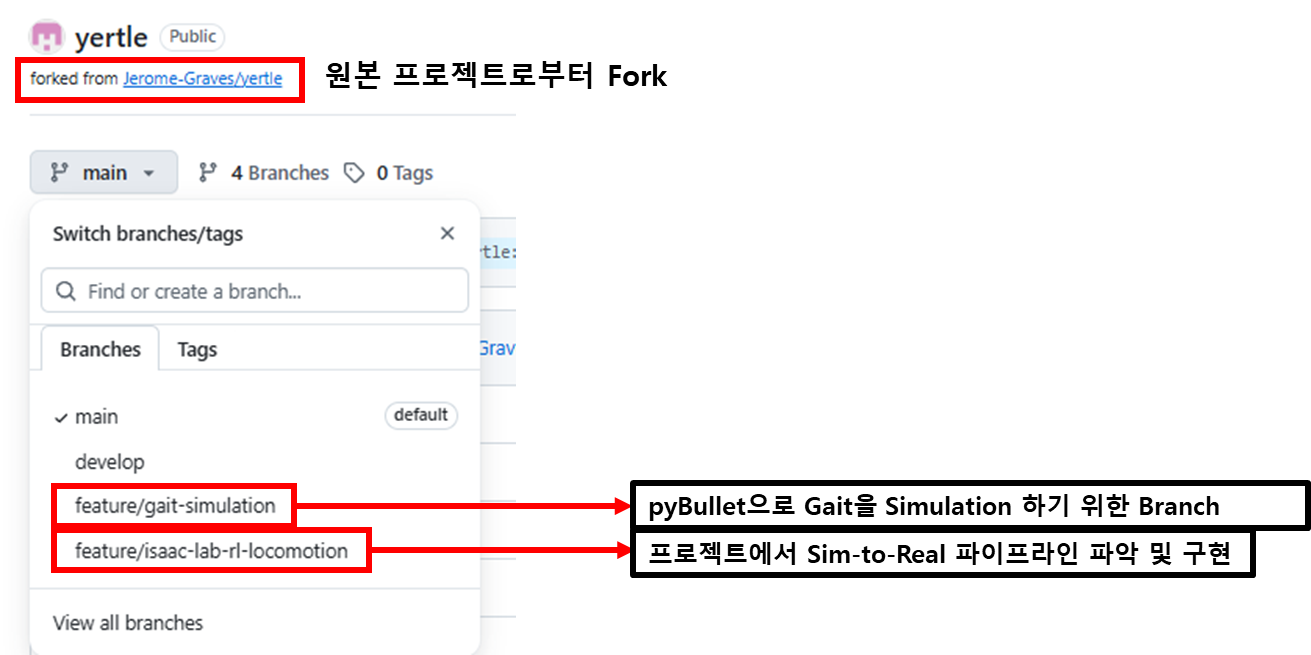
지난 포스트에서 Quadruped Robot 관련 오픈소스 프로젝트를 조사하였으며 결론적으로 Yertle이라는 오픈 소스 프로젝트로 진행하는 것으로 결정하였습니다. 그러므로 해당 프로젝트를 fork하고 brach를 새로 만들어 개발 중입니다. 그리고 해당 프로젝트가 어떻게 구성되어 있는지 확인하면서 제공해주는 software로 pyBullet으로 보행(gait) 실행하였지만 제대로 동작하지 않았습니다.그래서 제가 직접 코드를 리뷰하면서 pyBullet으로 전진하는 보행(Gait)기능을 개발하는 것으로 하였습니다.
2. 프로젝트 관리
프로젝트는 저번 포스트에서 선정한 Open source 프로젝트를 Fork하여 저와 같이 개발하는 후배가 서로의 Branch를 생성하여 개발하고 있습니다.
https://github.com/MainForm/yertle
GitHub - MainForm/yertle: A 3D Printed Quadrupedal Robot for Locomotion Research.
A 3D Printed Quadrupedal Robot for Locomotion Research. :turtle: - MainForm/yertle
github.com
3. pyBullet 시뮬레이션 실행
3.1. pyBullet 이란?
https://pybullet.org/wordpress/
실시간 물리 시뮬레이션(Real-Time Physics Simulation)으로 게임, 이미지 효과, 로봇틱스, 강화 학습을 위해 개발된 시뮬레이션 프로그램입니다. 파이썬으로 쉽게 시뮬레이션을 동작할 수 있는 장점이 있지만, 현재는 MuJoCo와 Isaac Sim으로 개발자들이 이동하여 현재는 많이쓰이지는 않는 시뮬레이터입니다.
하지만 여기서 pyBullet을 사용하는 이유는 원본 OpenSource에서 pyBullet을 사용하였기 때문에 처음 로봇 프로젝트를 진행하는 개발자로서 굳이 난이도를 높여 다른 시뮬레이터를 사용하는 것보다 이미 동작이 원본 프로젝트에서 검증된 pyBullet을 사용하는 것이 좋겠다고 판단하였습니다.
3.2. Docker로 개발 환경 구축
- dockerfile 파일
yertle/software/gait_simulation/Dockerfile at 0815d3e9af545d28b3c1a35e65eeecad07303e49 · MainForm/yertle
A 3D Printed Quadrupedal Robot for Locomotion Research. :turtle: - MainForm/yertle
github.com
- docker-compose 파일
yertle/software/gait_simulation/docker-compose.yaml at 0815d3e9af545d28b3c1a35e65eeecad07303e49 · MainForm/yertle
A 3D Printed Quadrupedal Robot for Locomotion Research. :turtle: - MainForm/yertle
github.com
위 도커 파일를 통해 개발 컨테이터를 생성하였습니다.
docker compose --profile dev up --build -d
그 후 VS code로 해당 컨테이너에 접속하여 개발을 진행할 수 있도록 하였습니다.
3.3. pyBullet 기본적인 실행 코드
yertle/software/gait_simulation/workspace/main.py at 8cc1078357227f6206225111b1f05664cd5ed12e · MainForm/yertle
A 3D Printed Quadrupedal Robot for Locomotion Research. :turtle: - MainForm/yertle
github.com
"""Run a minimal PyBullet GUI simulation."""

import time

import pybullet as p
import pybullet_data


def main() -> None:
	# GUI를 통해 로봇 움직임 관철
    client_id = p.connect(p.GUI)
    if client_id < 0:
        raise RuntimeError("Failed to connect to the PyBullet GUI")

    try:
    	# plane과 같은 기본적 URDF 파일이 포함된 디렉토리 추가
        p.setAdditionalSearchPath(pybullet_data.getDataPath())
        # 시뮬레이션의 중력 가속도를 설정합니다.
        p.setGravity(0, 0, -9.81)
        # 시뮬레이션에서 물리 연산이 동작하는 주기를 설정합니다.
        p.setTimeStep(1.0 / 240.0)

        # 바닥 URDF 모델을 불러옵니다.
        p.loadURDF("plane.urdf")

        print("PyBullet simulation is running. Press Ctrl+C to stop.")
        while p.isConnected():
            p.stepSimulation()
            time.sleep(1.0 / 240.0)
    except KeyboardInterrupt:
        print("Stopping the simulation.")
    finally:
        if p.isConnected():
            p.disconnect()


if __name__ == "__main__":
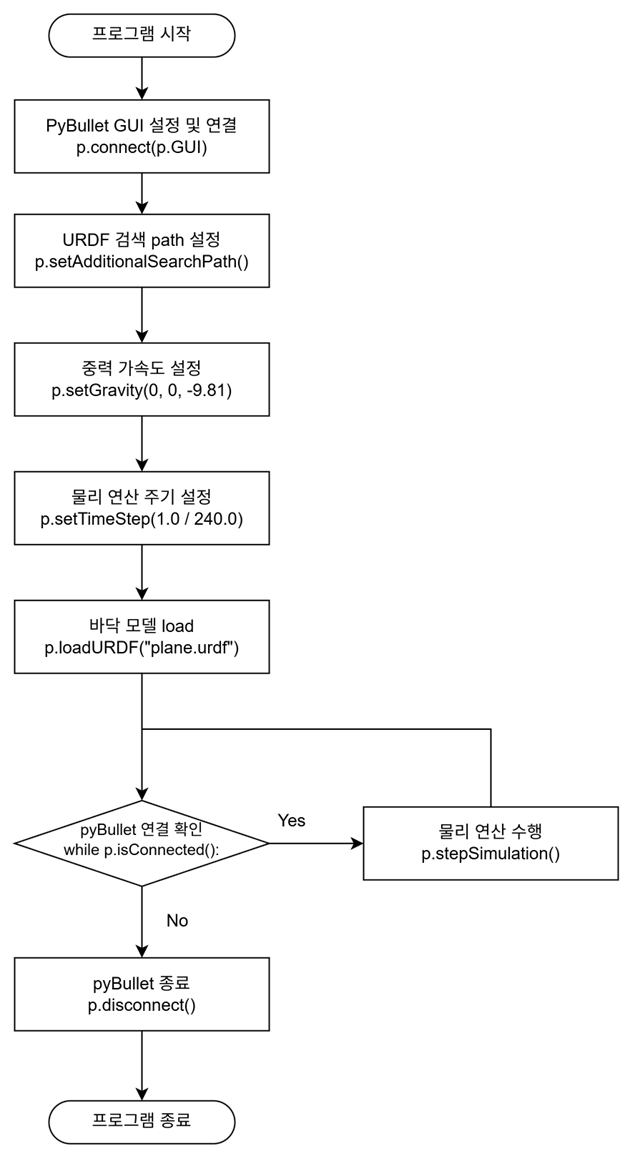
    main()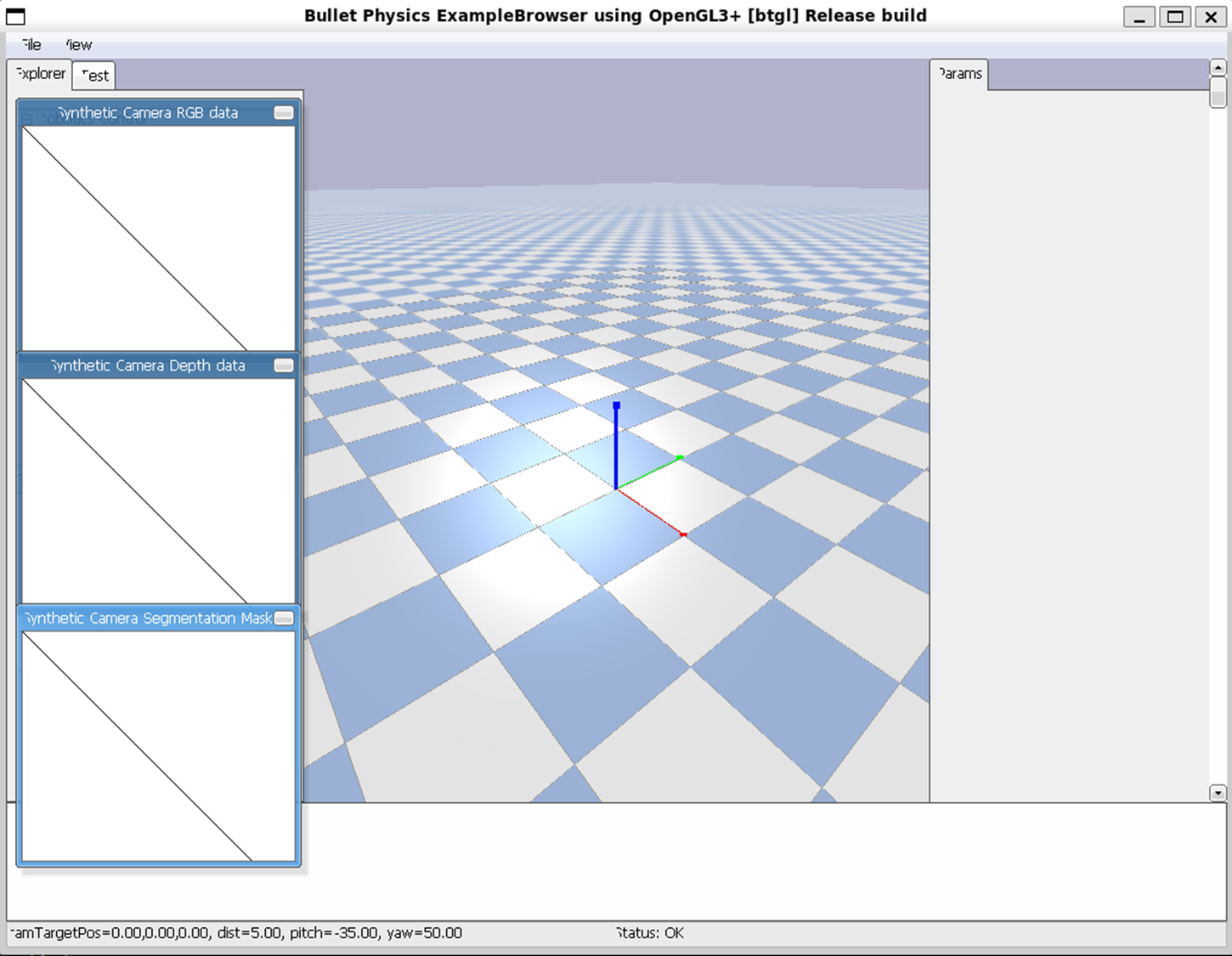
3.4. pyBullet 클래스화
pyBullet을 그대로 사용하기에는 몇가지 문제점이 있어 코드가 조금 많아지기 시작하면 개발 속도가 현저히 떨어지기 시작합니다. 그러므로 pyBullet을 클래스화 하여 해당 문제점을 해결하고 개발 속도를 높이고자 합니다.
3.4.1. pyBullet 문제점
- pyBullet 메소드의 자동완성 지원 안됨
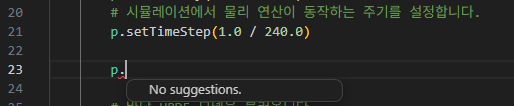
pyBullet은 type stub 피일(pyi)을 제공해주지 않아 자동완성 에서 어떤 메소드가 있고 메소드에 어떤 매개변수가 있는지 알려주지 않습니다.
- pyBullet 너무 많은 매개 변수
        body_id = p.loadURDF(
            fileName=str(path),
            basePosition=base_position,
            baseOrientation=base_orientation,
            useFixedBase=use_fixed_base,
            globalScaling=global_scaling,
            physicsClientId=self._physics_client,
        )
loadURDF의 경우 단순히 fileName만 전달해도 동작하지만 실제로 내부에서 사용하는 매개변수는 매우 많습니다. 이 매소드 뿐만이 아니라 pyBullet은 대부분의 매소드가 매우 매개 변수가 많아 일일이 작성하기 번거롭습니다.
위 문제점을 해결하기 위해 pyBullet을 클래스화 하여 더욱 단순하게 개발할 수 있는 환경을 만들 고자합니다.
yertle/software/gait_simulation/workspace/main.py at f4a5346867de288115d83c40832b56124ce7c42a · MainForm/yertle
A 3D Printed Quadrupedal Robot for Locomotion Research. :turtle: - MainForm/yertle
github.com
"""Run a minimal PyBullet simulation without loading URDF files."""

import pybullet as p

from simulation.simulation import Simulation

def main() -> None:
    try:
        with Simulation(fps=240, use_gui=True) as simulation:

            print("Simulation is running. Press Ctrl+C to stop.")
            while simulation.is_running():
                simulation.step()

    except KeyboardInterrupt:
        print("Stopping the simulation.")


if __name__ == "__main__":
    main()
실제로 클래스화 한후에 훨씬 직관적으로 개선된 것을 확인 할 수 있습니다.
3.4.2. Class Diagram 설계
yertle/software/gait_simulation/simulation_classdiagram.md at e834f0dce16571bb5b3242b0e0073a7af7b4e1d8 · MainForm/yertle
A 3D Printed Quadrupedal Robot for Locomotion Research. :turtle: - MainForm/yertle
github.com

크게 3개의 클래스로 나누어 클래스를 디자인 하였습니다.
- Simulation class
pyBullet 시뮬레이터를 나타내는 클래스입니다. 시뮬레이션에 대한 환경 및 생명주기(Life-time)를 담당합니다. - URDFManager
Load한 URDF Object를 관리하는 클래스입니다. Load 한 URDF Object을 관리하여 시뮬레이션내 URDF Object의 생명 주기를 관리합니다.
URDFManager를 따로 구현한 이유는 다음과 같습니다.
1. URDFManager class로 Simulation class내 기능을 분산
2. URDFManager class내 배열로 URDF Object를 관리
3. URDFObject의 소유 관계를 명시
특히 3번 이유를 다음과 코드를 구현하기 위합니다.
robot = simulation.load_urdf("robot.urdf")

# robot urdf의 주체가 simulation 인스턴스에 있음을 보여줌
simulation.unload_urdf(robot)
- URDFObject
UDRFObject에 대한 동작을 구현하기 위한 클래스입니다.
4. 결론
프로젝트의 크기가 커짐에 따라서 코드가 난잡해지고 가독성이 떨어져 개발 난이도가 올라가 결국 프로젝트가 진행되지 않는 것을 많이 경험하였습니다. 그러므로 pyBullet이 Method만 호출하는 절차적인 형태의 라이브러리 이므로 클래스화를 통해 가독성을 높여 개발 난이도를 낮추고자 하였습니다. 그리고 실제로 동작하는 main.py 코드의 량이 매우 줄어 있는 것을 보면 자기 방을 청소한 것 마냥 기분이 좋아집니다.
pyBullet으로 개발하는 것은 처음이여서 개발 관련 지식이 부족한 점이 많습니다. 하지만 새로운 것을 배워가는 것도 프로젝트를 진행하는 재미라고 생각합니다. pyBullet에 실제 Robot을 움직인다면 더욱더 희열감을 느낄 수 있을 것 같습니다. 다음 포스트에서는 실제 Robot을 Load한 후 해당 로봇이 어떻게 움직이는지 분석할 예정입니다.
'Project > Quadruped Robot 제작' 카테고리의 다른 글
| [Quadruped Robot] Yertle 로봇 관절 제어 확인 (0) | 2026.09.01 |
|---|---|
| [Quadruped Robot] 오픈 소스 프로젝트 조사 (0) | 2026.08.21 |
| [Quadruped Robot] 프로젝트 관련 준비 (0) | 2026.08.20 |