
- 분류 전체보기 (110)

| 일 | 월 | 화 | 수 | 목 | 금 | 토 |
|---|---|---|---|---|---|---|
| 1 | ||||||
| 2 | 3 | 4 | 5 | 6 | 7 | 8 |
| 9 | 10 | 11 | 12 | 13 | 14 | 15 |
| 16 | 17 | 18 | 19 | 20 | 21 | 22 |
| 23 | 24 | 25 | 26 | 27 | 28 | 29 |
| 30 | 31 |
- STM32
- 리눅스
- Visual Studio Code
- Raspberry
- UART
- raspberrypi
- esp32
- nucleo
- AArch64
- Visual Studio
- Linux
- yocto
- C++
- vscode
- AVR
- yocto project
- QEMU
- buildroot
- MVVM
- atmel
- bare metal
- 디버깅
- QT
- 아두이노
- Debug
- Arduino
- avr-gcc
- c#
- 라즈베리파이
- WPF
- Today
- Total
임베디드를 좋아하는 조금 특이한 개발자?
[Linux Kernel Module] Character Device의 Open, Release 콜백 함수 본문
[Linux Kernel Module] Character Device의 Open, Release 콜백 함수
Gordon_ 2026. 8. 9. 05:19- 개발 환경
개발 보드 : Raspberrypi 4
OS : Linux raspberrypi 6.18.39
- 소스 코드
Device_driver_Study/Character_Device at 4898fc395ce1063a810776e6335185543d9501ef · MainForm/Device_driver_Study
Contribute to MainForm/Device_driver_Study development by creating an account on GitHub.
github.com
1. 서론
문자 장치는 "/dev" 폴더 내에 장치 파일을 생성하고, 일반 애플리케이션이 해당 장치 파일에 접근하여 데이터를 교환합니다. 그리고 이러한 데이터의 흐름을 Callback 함수로 정의합니다. 그 중 이번 포스트에서 문자 장치 파일을 열 때 발생하는 Open Callback 함수와 닫을 때 발생하는 Release Callback 함수를 정의하고 실습해보도록 하겠습니다.
2. file_operations 구조체
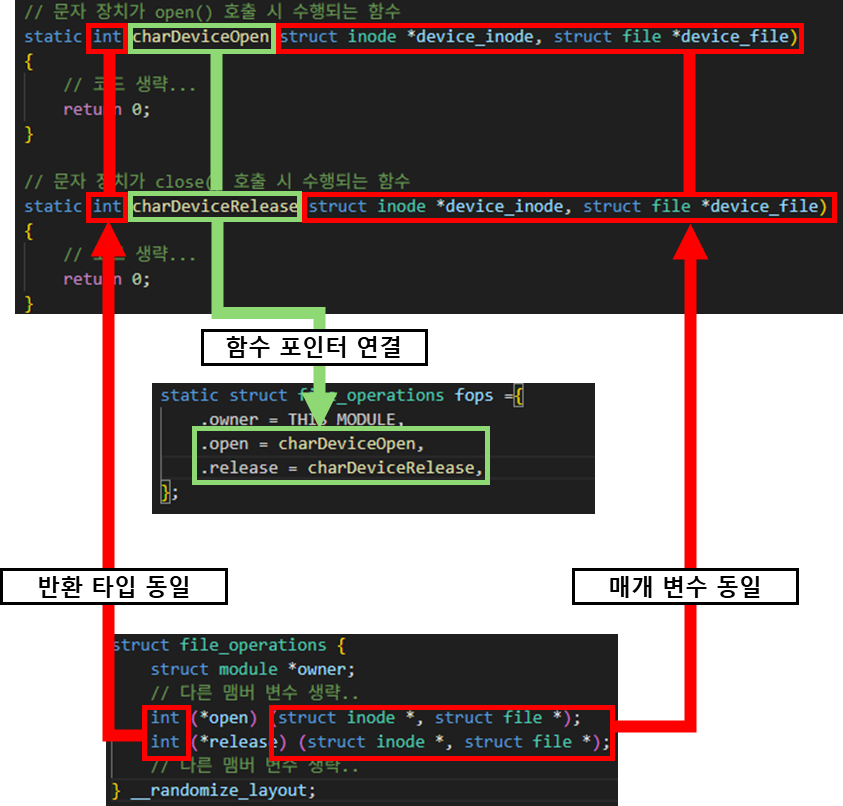
file_operations 구조체는 포인터 함수를 통해 커널이 Callback 함수를 호출 할 수 있도록 해주는 구조체입니다. 그러므로 해당 구조체를 확인하여 우리가 사용할 Callback 함수의 함수 포인터를 연결하여야 합니다. 그 중 우리가 사용할 open과 release 함수 포인터의 함수 원형을 확인하여 정의합니다.
- file_operations 코드
https://elixir.bootlin.com/linux/v6.18.39/source/include/linux/fs.h#L2271
struct file_operations {
	struct module *owner;
    // 다른 맴버 변수 생략..
	int (*open) (struct inode *, struct file *);
	int (*release) (struct inode *, struct file *);
    // 다른 맴버 변수 생략..
} __randomize_layout;
- char_device.c 코드
// 문자 장치가 open() 호출 시 수행되는 함수
static int charDeviceOpen(struct inode *device_inode, struct file *device_file)
{
    // 코드 생략...
    return 0;
}

// 문자 장치가 close() 호출 시 수행되는 함수
static int charDeviceRelease(struct inode *device_inode, struct file *device_file)
{
    // 코드 생략...
    return 0;
}

// 생성한 문자 장치을 제어하기 위한 함수를 관리하는 구조체
// 관련 맴버 함수들은 https://elixir.bootlin.com/linux/v6.18.39/source/include/linux/fs.h#L2271 에서 참고
static struct file_operations fops ={
    .owner = THIS_MODULE,
    .open = charDeviceOpen,
    .release = charDeviceRelease,
};
3. Open Callback 함수
// 문자 장치가 open() 호출 시 수행되는 함수
static int charDeviceOpen(struct inode *device_inode, struct file *device_file)
{
    pr_info("device opened\n");

    printk("----inode example----\n");

    // inode 번호 출력
    pr_info("inode number : %lu\n", device_inode->i_ino);

    // inode로 문자 장치의 major, minor 번호를 확인할 수 있음
    pr_info("major : %d\n", imajor(device_inode));
    pr_info("minor : %d\n", iminor(device_inode));

    // inode로 해당 파일의 권한 확인
    pr_info("uid : %u\n", device_inode->i_uid.val);
    pr_info("gid : %u\n", device_inode->i_gid.val);

    // inode를 통해 해당 파일이 어떤 종류인지 확인
    if(S_ISCHR(device_inode->i_mode)){
        pr_info("This is a character device\n");
    }

    printk("----file example----\n");

    // f_flags: 사용자 공간에서 open()에 전달한 플래그를 확인
    pr_info("f_flags : 0x%x\n", device_file->f_flags);

    switch (device_file->f_flags & O_ACCMODE) {
    case O_RDONLY:
        pr_info("open mode : O_RDONLY\n");
        break;
    case O_WRONLY:
        pr_info("open mode : O_WRONLY\n");
        break;
    case O_RDWR:
        pr_info("open mode : O_RDWR\n");
        break;
    }

    // f_mode: 커널이 관리하는 현재 파일의 읽기/쓰기 가능 여부를 확인
    pr_info("f_mode : 0x%x\n", device_file->f_mode);
    pr_info("FMODE_READ : %s\n",
            device_file->f_mode & FMODE_READ ? "yes" : "no");
    pr_info("FMODE_WRITE : %s\n",
            device_file->f_mode & FMODE_WRITE ? "yes" : "no");

    // f_inode: 이 열린 파일이 가리키는 inode를 확인
    // 직접 f_inode에 접근하기보다 file_inode() 사용을 권장
    pr_info("f_inode number : %lu\n", file_inode(device_file)->i_ino);
    pr_info("inode arguments are same : %s\n",
            file_inode(device_file) == device_inode ? "yes" : "no");

    return 0;
}
Open Callback 함수의 경우 inode 구조체와 file 구조체를 통해 문자 장치 파일에 대한 정보를 확인하고, 정적 메모리 할당등 장치가 동작하기 위한 초기화를 담당합니다.
하지만, 지금은 단순히 Open, Release Callback 에 대한 내용에 집중할 것이므로 inode 구조체와 file 구조체 사용 방법에 대해서 집중하도록 하겠습니다.

3.1. inode 구조체
inode는 리눅스에서 파일 자체에 대한 메타데이터를 담고 있는 구조체입니다. 대부분 "ls" 명령어를 통해 볼 수 있는 파일 메타데이터를 확인 할 수 있습니다.
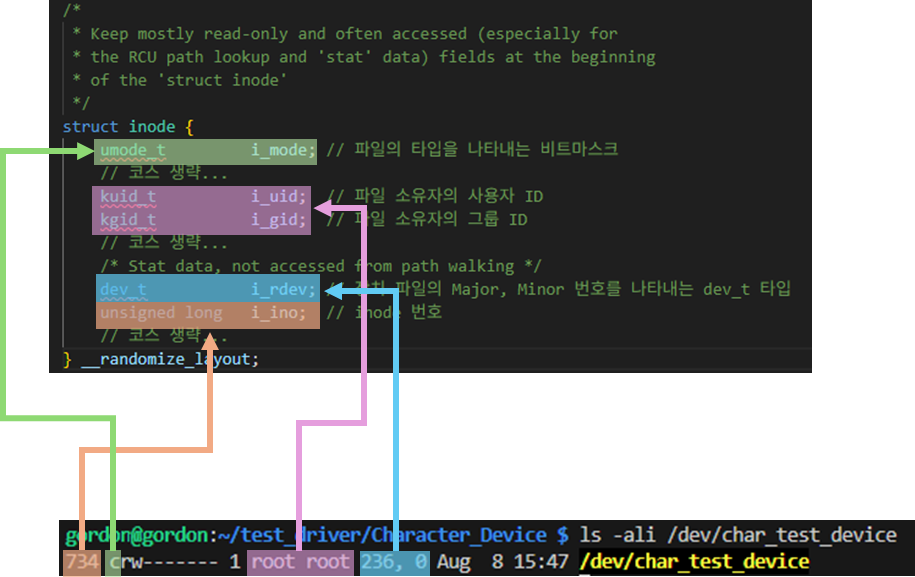
inode 구조체 관련 예제 코드
    printk("----inode example----\n");

    // inode 번호 출력
    pr_info("inode number : %lu\n", device_inode->i_ino);

    // inode로 문자 장치의 major, minor 번호를 확인할 수 있음
    pr_info("major : %d\n", imajor(device_inode));
    pr_info("minor : %d\n", iminor(device_inode));

    // inode로 해당 파일의 권한 확인
    pr_info("uid : %u\n", device_inode->i_uid.val);
    pr_info("gid : %u\n", device_inode->i_gid.val);

    // inode를 통해 해당 파일이 어떤 종류인지 확인
    if(S_ISCHR(device_inode->i_mode)){
        pr_info("This is a character device\n");
    }

3.2. file 구조체
참고 자료
file 구조체는 프로세스에서 파일에 접근하기 위한 인스턴스 정보를 저장하는 구조체 입니다. 프로세스에서 파일에 접근하기 위해 open() 함수를 사용할때 file 구조체의 인스턴스가 생성되며, User space에서 FD(File Descriptor)를 통해 file 구조체에 접근하는 것입니다.
file 구조체 관련 코드
    printk("----file example----\n");

    // f_flags: 사용자 공간에서 open()에 전달한 플래그를 확인
    pr_info("f_flags : 0x%x\n", device_file->f_flags);

    switch (device_file->f_flags & O_ACCMODE) {
    case O_RDONLY:
        pr_info("open mode : O_RDONLY\n");
        break;
    case O_WRONLY:
        pr_info("open mode : O_WRONLY\n");
        break;
    case O_RDWR:
        pr_info("open mode : O_RDWR\n");
        break;
    }

    // f_mode: 커널이 관리하는 현재 파일의 읽기/쓰기 가능 여부를 확인
    pr_info("f_mode : 0x%x\n", device_file->f_mode);
    pr_info("FMODE_READ : %s\n",
            device_file->f_mode & FMODE_READ ? "yes" : "no");
    pr_info("FMODE_WRITE : %s\n",
            device_file->f_mode & FMODE_WRITE ? "yes" : "no");

    // f_inode: 이 열린 파일이 가리키는 inode를 확인
    // 직접 f_inode에 접근하기보다 file_inode() 사용을 권장
    pr_info("f_inode number : %lu\n", file_inode(device_file)->i_ino);
    pr_info("inode arguments are same : %s\n",
            file_inode(device_file) == device_inode ? "yes" : "no");
User space 예제 코드
int fd = open(CHAR_DEV_PATH, O_RDWR);
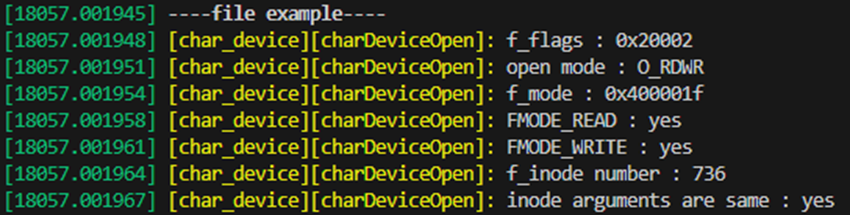
해당 예제 코드는 3가지 맴버 변수를 확인하였습니다. 각 맴버 변수에 대해서 좀더 자세히 알아보도록 하겠습니다.
3.2.1. f_flags 맴버 변수
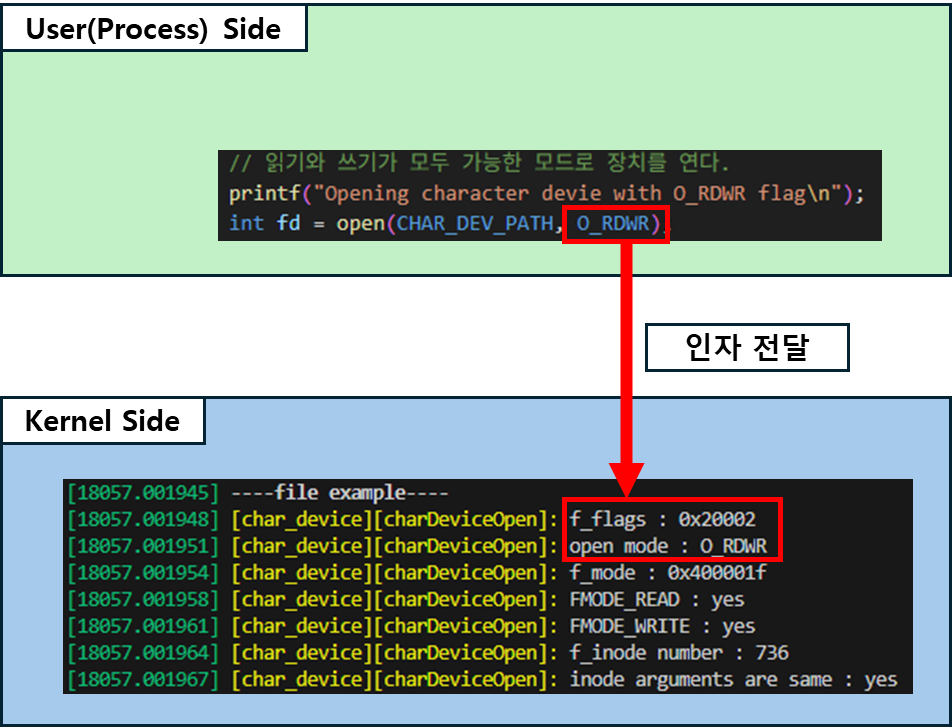
f_flags는 User space 관점에서 프로세스가 어떻게 file을 open 했는지를 나타내는 맴버 변수입니다. 해당 문자 장치를 User Space가 어떤 기능(f_flags)들을 설정하여 파일을 열었는지를 보여줍니다.
3.2.2. f_mode 맴버 변수
f_mode는 Kernel 관점에서 실제 해당 파일의 권한을 나타내는 맴버변수입니다. 이를 통해 해당 파일이 실제로 어떤 동작을 허용하는지 확인 할 수 있습니다.

3.2.3. f_inode 맴버 변수
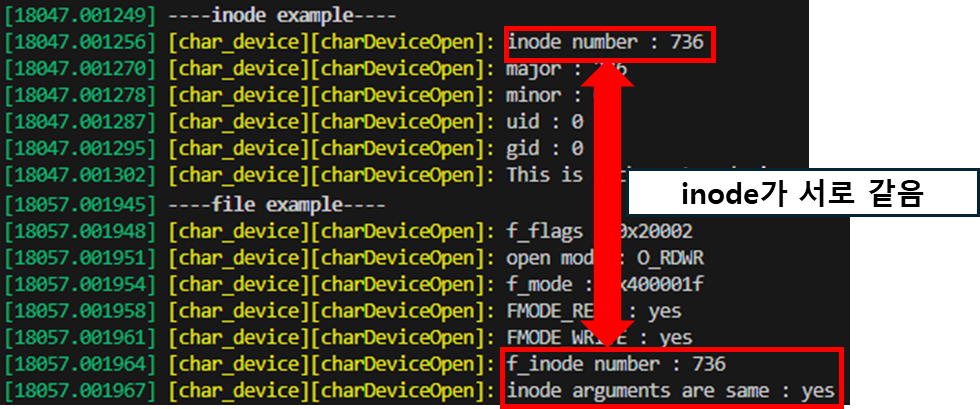
f_inode 맴버 변수를 통해 inode 인스턴스에 접근 할 수 있습니다. 실제로 file 구조체로 접근한 inode와 매개 변수의 inode의 inode 번호가 서로 동일한 것을 확인할 수 있습니다.
4. 동작 테스트
4.1. file 구조체의 f_flags 테스트
// -----------------------------------------------------------------
    // 예제 1: 접근 모드를 바꾸어 장치를 각각 한 번씩 열기
    // 드라이버의 struct file에서 f_flags와 f_mode의 차이를 확인한다.
    // -----------------------------------------------------------------
    printf("example1 : char device open\n");

    // 읽기와 쓰기가 모두 가능한 모드로 장치를 연다.
    printf("Opening character devie with O_RDWR flag\n");
    int fd = open(CHAR_DEV_PATH, O_RDWR);

    // open()은 실패하면 -1을 반환하고 errno를 설정한다.
    if (fd == -1) {
        perror("open");
        return 1;
    }

    // fd는 현재 프로세스의 파일 디스크립터 테이블 인덱스이다.
    // 드라이버에는 fd가 아니라 이 fd가 가리키는 struct file이 전달된다.
    printf("device opened: fd=%d\n", fd);

    // 장치가 열린 상태를 유지하여 커널 로그를 확인할 시간을 확보한다.
    sleep(5);

    // close() 시 드라이버의 release 콜백이 호출된다.
    if (close(fd) == -1) {
        perror("close");
        return 1;
    }

    // 같은 장치를 읽기 전용 모드로 다시 연다.
    // 앞선 O_RDWR 호출과 f_flags 및 f_mode 값이 어떻게 다른지 확인한다.
    printf("Opening character devie with O_RDONLY flag\n");
    fd = open(CHAR_DEV_PATH, O_RDONLY);

    printf("device opened: fd=%d\n", fd);
    sleep(5);

    if (close(fd) == -1) {
        perror("close");
        return 1;
    }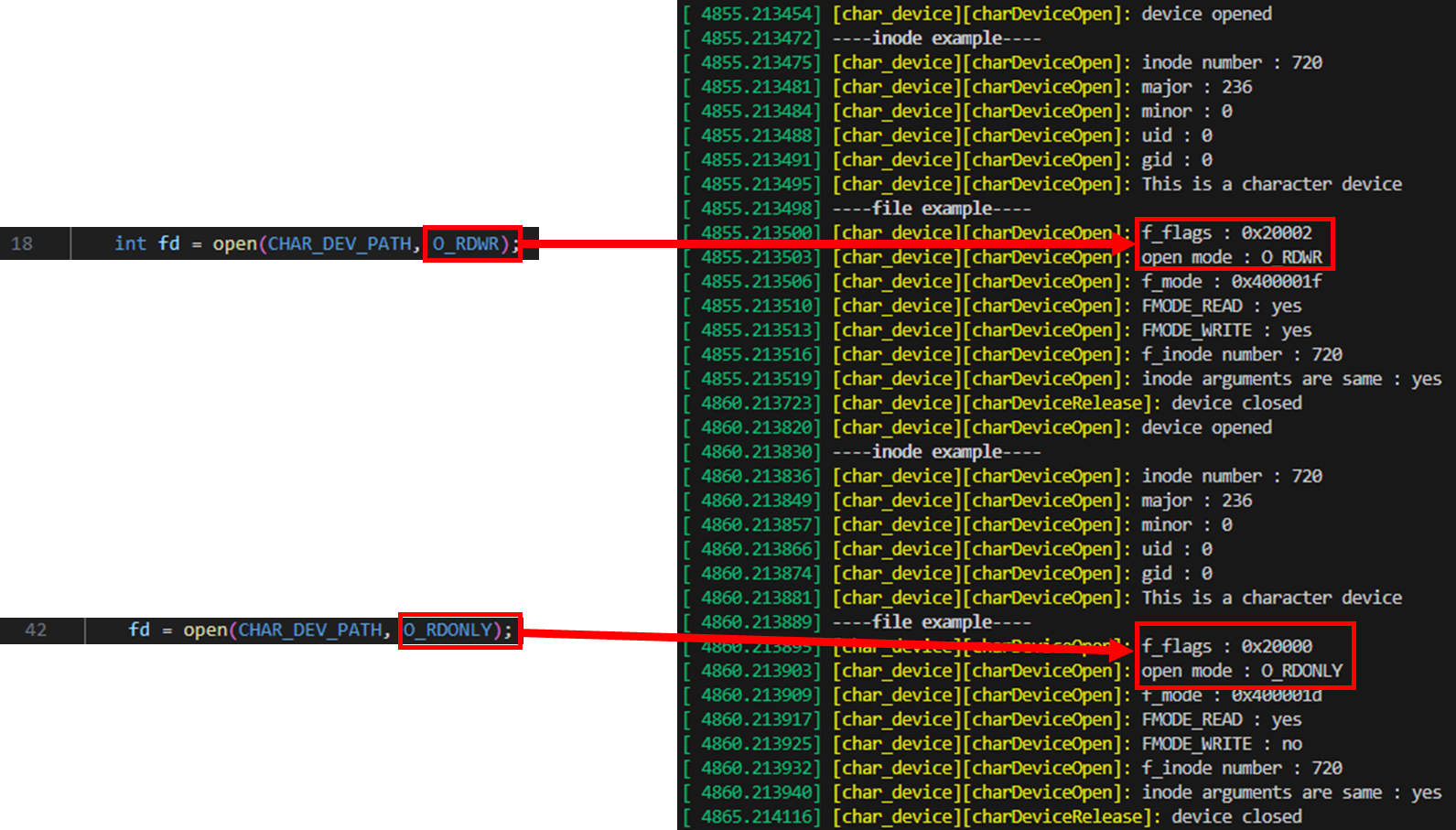
출력 결과를 보면 실제로 open의 flag와 동일한 flag가 전달되는 것을 확인 할 수 있습니다.
4.2. file 구조체의 동시 접근
    // -----------------------------------------------------------------
    // 예제 2: 같은 문자 장치를 동시에 두 번 열기
    // 각 open()은 서로 다른 fd와 struct file을 만들 수 있지만,
    // 두 struct file은 같은 장치 노드의 inode를 가리킨다.
    // -----------------------------------------------------------------
    printf("example2 : multiple char device open\n");

    // 첫 번째 열린 파일 인스턴스: 읽기/쓰기 모드
    int fd1 = open(CHAR_DEV_PATH, O_RDWR);
    if (fd1 == -1) {
        perror("open");
        return 1;
    }

    // 두 open 콜백의 로그를 시간상 구분하기 위한 대기
    sleep(1);

    // 두 번째 열린 파일 인스턴스: 읽기 전용 모드
    int fd2 = open(CHAR_DEV_PATH, O_RDONLY);
    if (fd2 == -1) {
        perror("open");
        return 1;
    }

    // 두 fd가 동시에 열린 상태를 유지한다.
    sleep(5);

    // 두 번째 fd부터 닫아 release 콜백 호출 순서를 확인한다.
    close(fd2);
    sleep(1);
    close(fd1);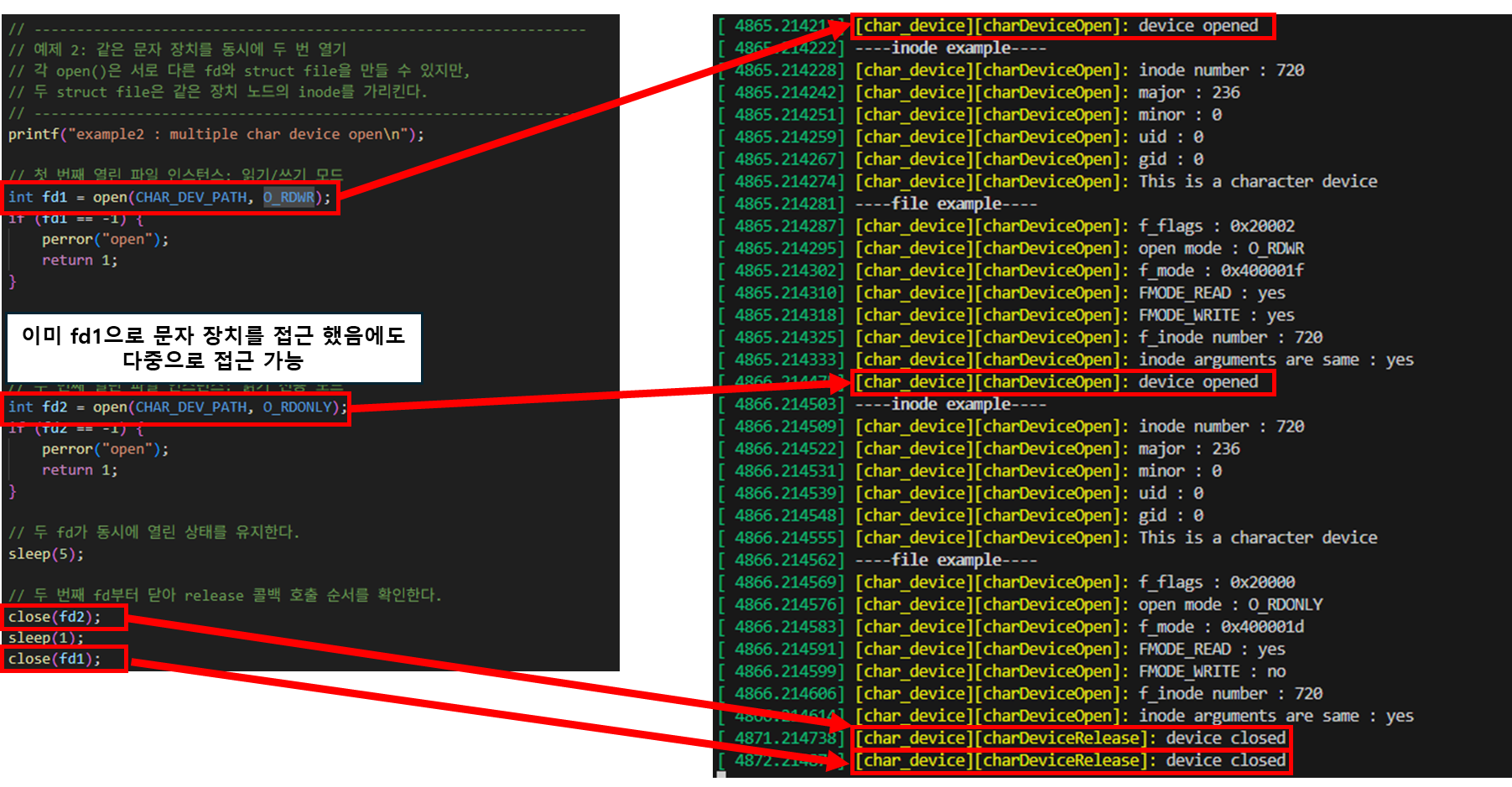
5. 결론
이제 문자 장치가 open, release까지 정상적으로 동작하는 것을 확인하였습니다. 이제 read, write를 추가하여 실질적으로 User space의 프로세스와 데이터를 교환하는 방법을 다음 포스트에서 확인해보도록 하겠습니다.
'Embedded > Linux' 카테고리의 다른 글
| [Linux Kernel Module] Character Device의 장치 노드 자동 생성 (0) | 2026.03.28 |
|---|---|
| [Linux Kernel Module] Character Device(문자 장치) 초기화 및 생성 (0) | 2025.08.11 |
| [Linux Kernel Module] 개발 프로젝트 구성 (0) | 2025.08.09 |
| [Linux Kernel Debugging] VScode로 간편히 Linux kernel 디버깅하기 (0) | 2025.08.05 |
| [Linux Debugging] QEMU로 실행한 Linux를 GDB로 디버깅 (0) | 2025.08.05 |


