
| 일 | 월 | 화 | 수 | 목 | 금 | 토 |
|---|---|---|---|---|---|---|
| 1 | 2 | 3 | 4 | |||
| 5 | 6 | 7 | 8 | 9 | 10 | 11 |
| 12 | 13 | 14 | 15 | 16 | 17 | 18 |
| 19 | 20 | 21 | 22 | 23 | 24 | 25 |
| 26 | 27 | 28 | 29 | 30 | 31 |
- Visual Studio Code
- avr-gcc
- MVVM
- QEMU
- UART
- esp32
- AArch64
- AVR
- bare metal
- Raspberry
- Linux
- Visual Studio
- 디버깅
- buildroot
- WPF
- 아두이노
- yocto
- vscode
- 라즈베리파이
- STM32
- c#
- Arduino
- nucleo
- atmel
- Debug
- Debugging
- raspberrypi
- GPIO
- 회로
- C++
- Today
- Total
임베디드를 좋아하는 조금 특이한 개발자?
[WPF][MVVM] MVVM 패턴을 위한 ViewModel 추가 본문
- 개발 환경
Window 11 (버전 24H2)
Visual Studio Community 2026 (18.0.2)
.NET framework 4.7.2
- 소스 코드
https://github.com/MainForm/WPF_MVVM_Base/tree/03d346fe93499c50289eb4085917b4e2839389ad
GitHub - MainForm/WPF_MVVM_Base
Contribute to MainForm/WPF_MVVM_Base development by creating an account on GitHub.
github.com
1. 서론
ViewModel은 Model에서 전달 받은 데이터를 View에서 디자인한 UI에 출력하기 위한 모듈입니다. Model과 View를 연결해주는 모듈로 MVVM 패턴에서 가장 핵심이 되는 모듈입니다. 더나아가 Binding이라는 기능을 통해 View와의 의존성을 줄이고 Inerface를 통해 Model과의 의존성을 줄여 더욱 쉽게 협업 가능한 프로젝트를 구성할 수 있습니다.
ViewModel은 하나의 View에 하나의 ViewModel로 1:1대응하여 구성하는 것이 일반적입니다. 하지만, View 내 UI가 복잡해져 여러가지 서브 패널(Panel)이 필요한 경우 추가적은 ViewModel를 구성할 수 있습니다. 하지만 이번 포스트에서는 간단하게 ViewModel의 뼈대가 되는 ViewModelBase를 작성하고 MainWindow에 해당하는 MainViewModel를 추가할 것입니다.
2. ViewModelBase 작성
ViewModelBase는 모든 ViewModel에서 상속하여 사용할 클레스입니다. 해당 클래스를 작성하는 목적은 Binding를 사용할 때 속성의 값을 변경시 자동적으로 UI 업데이트 되도록 하기 위합니다.
먼저 ViewModel를 추가할 ViewModels 폴더를 프로젝트에 추가합니다.

이제 ViewModelBase.cs 파일을 ViewModels 폴더에 추가합니다.


ViewModelBase를 아래와 같이 작성합니다.
using System;
using System.Collections.Generic;
using System.ComponentModel;
using System.Linq;
using System.Runtime.CompilerServices;
using System.Text;
using System.Threading.Tasks;

namespace WPF_MVVM_Base.ViewModels
{
    public class ViewModelBase : INotifyPropertyChanged
    {
        public event PropertyChangedEventHandler PropertyChanged;

        protected void OnPropertyChanged([CallerMemberName] string propertyName = null)
        {
            PropertyChanged?.Invoke(this, new PropertyChangedEventArgs(propertyName));
        }

        protected bool SetProperty<T>(ref T storage, T value, [CallerMemberName] string propertyName = null)
        {
            if (Equals(storage, value))
                return false;

            storage = value;
            OnPropertyChanged(propertyName);
            return true;
        }
    }
}
3. MainViewModel 작성
ViewModels 폴더에 MainWindowViewModel를 추가합니다.
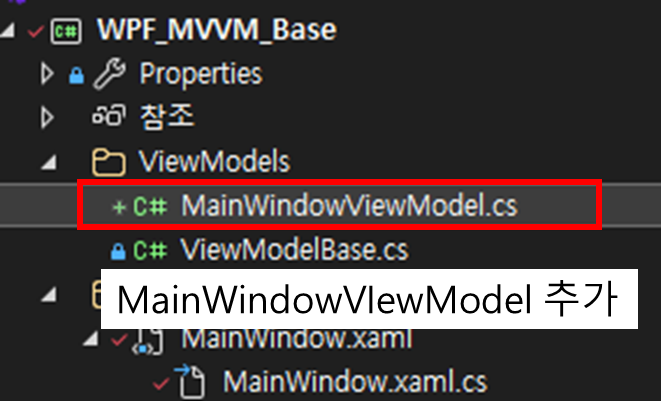
using System;
using System.Collections.Generic;
using System.Linq;
using System.Text;
using System.Threading.Tasks;

namespace WPF_MVVM_Base.ViewModels
{
    public class MainWindowViewModel : ViewModelBase
    {

    }
}
아직 MainWindow에 UI를 추가하지 않았으므로 추가적인 코드는 필요 없습니다.
4. View모델에 ViewModel 연결
using System;
using System.Collections.Generic;
using System.Linq;
using System.Text;
using System.Threading.Tasks;
using System.Windows;
using System.Windows.Controls;
using System.Windows.Data;
using System.Windows.Documents;
using System.Windows.Input;
using System.Windows.Media;
using System.Windows.Media.Imaging;
using System.Windows.Navigation;
using System.Windows.Shapes;

namespace WPF_MVVM_Base
{
    /// <summary>
    /// MainWindow.xaml에 대한 상호 작용 논리
    /// </summary>
    public partial class MainWindow : Window
    {
        public MainWindow()
        {
            InitializeComponent();

            // DataContext에 MainViewModel 연결
            this.DataContext = new ViewModels.MainWindowViewModel();
        }
    }
}
Views/MainWindow.xaml.cs
MainWindow 클래스의 DataContext 속성에 MainViewModel 인스턴스를 생성하여 추가합니다.
<Window x:Class="WPF_MVVM_Base.MainWindow"
        xmlns="http://schemas.microsoft.com/winfx/2006/xaml/presentation"
        xmlns:x="http://schemas.microsoft.com/winfx/2006/xaml"
        xmlns:d="http://schemas.microsoft.com/expression/blend/2008"
        xmlns:mc="http://schemas.openxmlformats.org/markup-compatibility/2006"
        xmlns:local="clr-namespace:WPF_MVVM_Base"
        xmlns:vm="clr-namespace:WPF_MVVM_Base.ViewModels"
        mc:Ignorable="d"

        d:DataContext="{d:DesignInstance Type=vm:MainWindowViewModel}"
        Title="MainWindow" Height="450" Width="800">
    <Grid>
    </Grid>
</Window>
Views/MainWindow.xaml
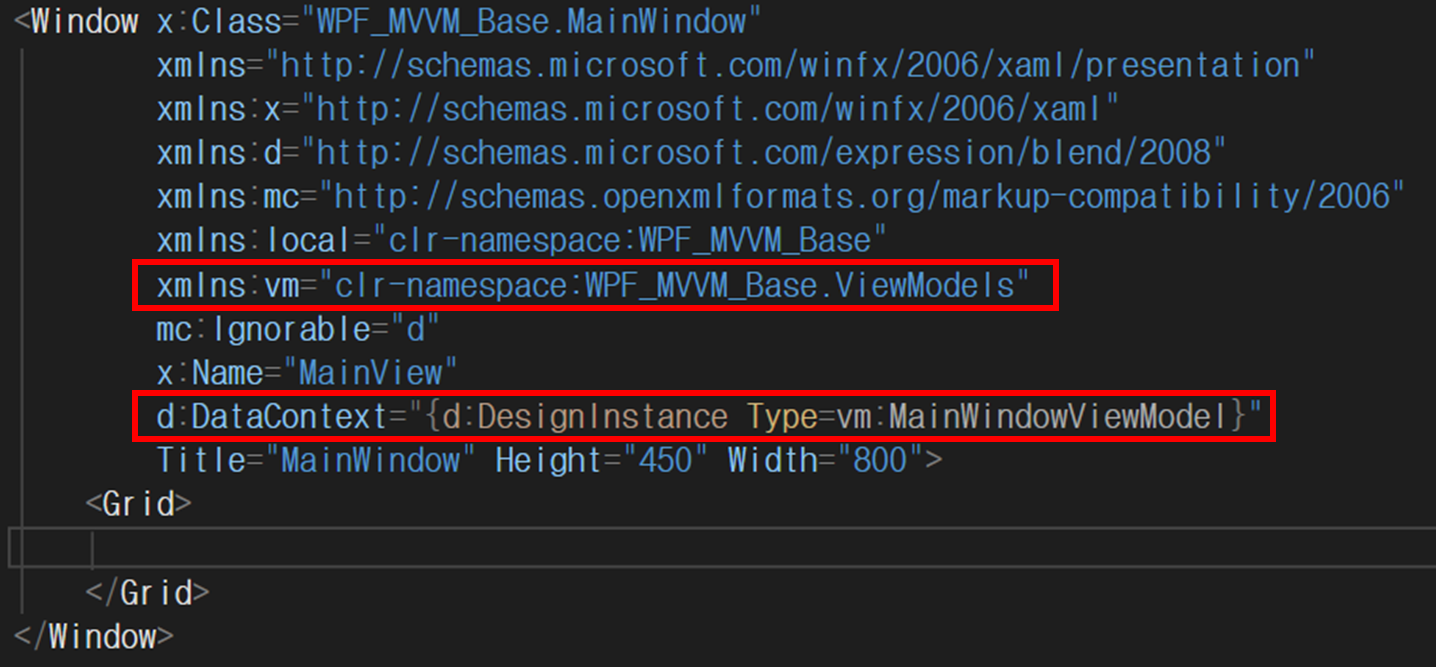
위와 같이 XAML에도 MainViewModel를 설정합니다. 위 설정을 통해 XAML에서 Binding할 시 자동완성기능이 동작하여 훨씬 편하게 UI를 디자인 할 수 있습니다.
5. 정리
이제 ViewModel까지 프로젝트에 추가하였습니다. 이제 기본적인 MVVM 패턴의 프로젝트 구성은 마쳤습니다. 다음으로 이제 Button과 같은 Control의 Event를 Binding하기 위한 RelayCommand와 ICommand에 대해서 살펴보고, 버튼의 이벤트를 Binding하여 동작하는 예제를 해보도록 하겠습니다.
'C# > WPF' 카테고리의 다른 글
| [WPF][MVVM] RelayCommand로 Button 동작을 ViewModel에 연결 (0) | 2026.06.18 |
|---|---|
| [WPF] XAML만으로 간단히 Data Binding하기 (0) | 2025.12.17 |
| [WPF][MVVM] MVVM 패턴을 위한 프로젝트 구성 (0) | 2025.12.12 |
| [WPF] XAML을 통해 Label로 HelloWorld 출력 (0) | 2025.04.04 |
| [WPF] 버튼 컨트롤을 통한 메세지 박스 출력 (0) | 2025.04.04 |
